

Hola a todos, hoy os voy a explicar como podemos crear un logger con NestJS.
En NestJs, es interesante guardar todo lo que va pasando en el programa, ya que es normal que se ejecute constantemente, en caso de fallo podamos ver que ha pasado.
Lo ideal es tenerlo separados por días.
Necesitamos instalar las siguientes dependencias:
|
1 |
npm install winston winston-daily-rotate-file |
winston es una dependencia muy conocida para almacenar información en ficheros.
wiston-daily-rotate-file es igual que la anterior pero pudiendo rotar los logs por días.
En nuestro nuevo proyecto, crearemos una carpeta llamada services y nos crearemos dentro un servicio llamado logger.service.
|
1 2 3 4 5 6 |
import { Injectable } from '@nestjs/common'; @Injectable() export class LoggerService { } |
Os dejo el contenido que tendría este servicio.
|
1 2 3 4 5 6 7 8 9 10 11 12 13 14 15 16 17 18 19 20 21 22 23 24 25 26 27 28 29 30 31 32 33 34 35 36 37 38 39 40 41 42 43 44 45 46 47 48 49 50 51 52 53 54 55 56 57 58 59 60 61 62 63 64 65 66 67 68 69 70 71 72 73 74 75 76 77 78 79 80 81 82 83 84 85 86 87 88 89 90 91 92 93 94 95 96 97 98 99 100 101 102 103 104 105 106 107 108 109 110 111 112 113 114 115 116 117 118 119 120 121 122 123 124 125 126 127 128 129 130 131 132 133 134 135 136 137 138 139 140 141 142 143 144 145 146 147 148 149 150 151 152 153 154 155 156 157 158 159 160 |
import { Injectable } from '@nestjs/common'; import { format, createLogger, Logger, transports } from 'winston'; import 'winston-daily-rotate-file'; @Injectable() export class LoggerService { // loggers usados private loggerInfo: Logger; private loggerError: Logger; private loggerWarn: Logger; private loggerAll: Logger; constructor(){ this.createLoggers(); this.replaceConsole(); } /** * Crea los loggers */ createLoggers(){ // Formato de texto const textFormat = format.printf((log) => { return `${log.timestamp} - [${log.level.toUpperCase().charAt(0)}] ${log.message}`; }) // Formato de fecha const dateFormat = format.timestamp({ format: 'YYYY-MM-DD HH:mm:ss' }) // Logger de info this.loggerInfo = createLogger({ level: 'info', format: format.combine( dateFormat, textFormat ), transports: [ new transports.DailyRotateFile({ filename: 'log/info/info-%DATE%.log', datePattern: 'YYYY-MM-DD', maxFiles: '7d' }) ] }); // Logger de error this.loggerError = createLogger({ level: 'error', format: format.combine( dateFormat, textFormat ), transports: [ new transports.DailyRotateFile({ filename: 'log/error/error-%DATE%.log', datePattern: 'YYYY-MM-DD', maxFiles: '7d' }) ] }); // Logger de warn this.loggerWarn = createLogger({ level: 'warn', format: format.combine( dateFormat, textFormat ), transports: [ new transports.DailyRotateFile({ filename: 'log/warn/warn-%DATE%.log', datePattern: 'YYYY-MM-DD', maxFiles: '7d' }) ] }); // Logger donde almacenamos todo, ademas de la consola this.loggerAll = createLogger({ format: format.combine( dateFormat, textFormat ), transports: [ new transports.DailyRotateFile({ filename: 'log/all/all-%DATE%.log', datePattern: 'YYYY-MM-DD', maxFiles: '7d' }), new transports.Console() ] }); } /** * Remplaza la funcionalidad de los console.log, console.error y console.warn */ replaceConsole(){ // console.log console.log = (message: any, params: any) => { if(params){ this.loggerInfo.info(message + " " + JSON.stringify(params)); this.loggerAll.info(message + " " + JSON.stringify(params)); }else{ this.loggerInfo.info(message); this.loggerAll.info(message); } } // console.error console.error = (message: any, params: any) => { if(params){ this.loggerError.error(message + " " + JSON.stringify(params)); this.loggerAll.error(message + " " + JSON.stringify(params)); }else{ this.loggerError.error(message); this.loggerAll.error(message); } } // console.warn console.warn = (message: any, params: any) => { if(params){ this.loggerWarn.warn(message + " " + JSON.stringify(params)); this.loggerAll.warn(message + " " + JSON.stringify(params)); }else{ this.loggerWarn.warn(message); this.loggerAll.warn(message); } } } // Estos métodos son necesarios log(message: string){ this.loggerInfo.info(message); this.loggerAll.info(message); } error(message: string){ this.loggerError.error(message); this.loggerAll.error(message); } warn(message: string){ this.loggerWarn.warn(message); this.loggerAll.warn(message); } debug(message: string){ } verbose(message: string){ } } |
En el fichero main.ts, tenemos que agregar que use este logger.
|
1 2 3 4 5 6 7 8 9 10 11 |
import { NestFactory } from '@nestjs/core'; import { AppModule } from './app.module'; import { LoggerService } from './services/logger.service'; async function bootstrap() { const app = await NestFactory.create(AppModule, { logger: new LoggerService() // Creacion de nuestro logger }); await app.listen(3000); } bootstrap(); |
El resultado es el siguiente:
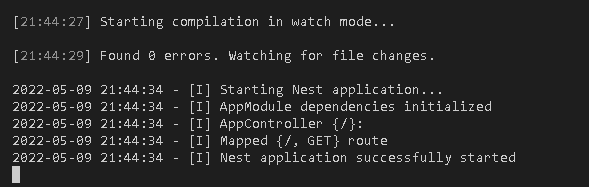
Esto creará una carpeta log con diferentes carpetas donde se almacenaran estos logs.
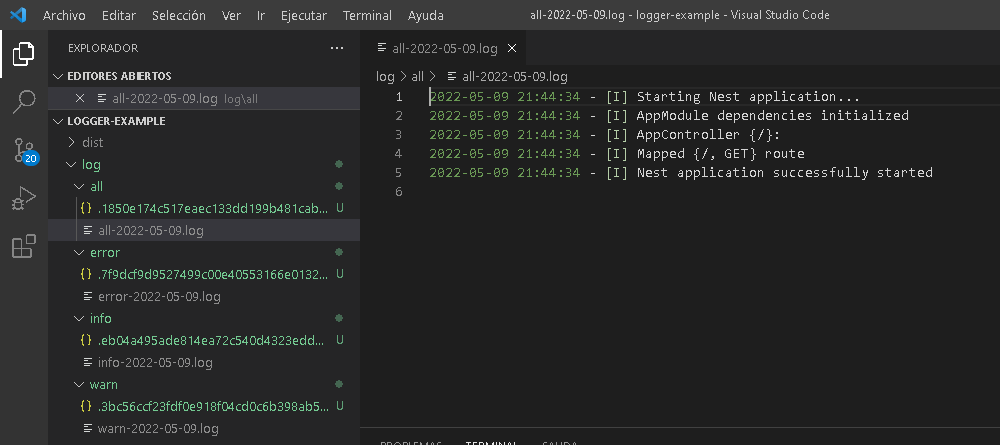
Gracias al paquete de winston-daily-rotate-file cuando sea un día diferente, se almacenará automáticamente en otro fichero. Podemos indicar el numero de días máximo (maxFiles).
Te dejo el repositorio con el ejemplo completo.
https://github.com/DiscoDurodeRoer/nestjs-logger-example
Espero que os sea de ayuda. Si tenéis dudas, preguntad. Estamos para ayudarte.


Deja una respuesta