

Hola a todos, hoy os voy a explicar como podemos leer un fichero linea a linea con C#.
Para leer ficheros de texto en C#, podemos utilizar StreamReader y con su método ReadLine() podemos leer una linea.
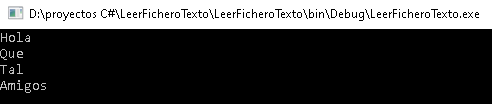
En la carpeta Debug de nuestro fichero, tendremos un fichero llamado test.txt con el siguiente contenido:

Para crear el fichero, lo podemos hacer así:
|
1 |
System.IO.StreamReader file = new System.IO.StreamReader("test.txt"); |
La forma de ir leyendo linea a linea es la siguiente:
|
1 2 3 4 5 |
string line; while ((line = file.ReadLine()) != null) { System.Console.WriteLine(line); } |
Recuerda de cerrar el fichero:
|
1 |
file.Close(); |
Este es el resultado:
Pero, ¿que pasa si el fichero no existe? Saltará error y se parará el programa, para solucionarlo debemos poner un try catch:
|
1 2 3 4 5 6 7 8 9 10 11 12 13 14 15 16 17 18 |
try { System.IO.StreamReader file = new System.IO.StreamReader("test.txt"); string line; while ((line = file.ReadLine()) != null) { System.Console.WriteLine(line); } file.Close(); } catch (System.IO.FileNotFoundException) { Console.WriteLine("No se ha encontrado el archivo"); } |
Os dejo un vídeo donde lo explico paso a paso:
Os dejo el ejemplo completo:
|
1 2 3 4 5 6 7 8 9 10 11 12 13 14 15 16 17 18 19 20 21 22 23 24 25 26 27 28 29 30 31 32 33 34 35 |
using System; using System.Collections.Generic; using System.Linq; using System.Text; using System.Threading.Tasks; namespace LeerFicheroTexto { class Program { static void Main(string[] args) { try { System.IO.StreamReader file = new System.IO.StreamReader("test.txt"); string line; while ((line = file.ReadLine()) != null) { System.Console.WriteLine(line); } file.Close(); } catch (System.IO.FileNotFoundException) { Console.WriteLine("No existe el fichero"); } System.Console.ReadLine(); } } } |
Espero que os sea de ayuda. Si tenéis dudas, preguntad. Estamos para ayudarte.


Deja una respuesta